Save recipes from Gousto, HelloFresh, BBC Good Food or anywhere else. Pick this week's meals, set servings, and Basket List builds one smart shopping list for wherever you shop.
How Basket List Works
Add recipes
1 / 3
From recipe ideas to one tidy shop
Three simple steps from the recipes you already cook to one clear shopping list you can use anywhere.
Import recipes from Gousto, HelloFresh, BBC Good Food or add your own family favourites.
Choose what you're cooking and adjust servings for your household.
Basket List combines the ingredients into one smart list you can use wherever you shop.
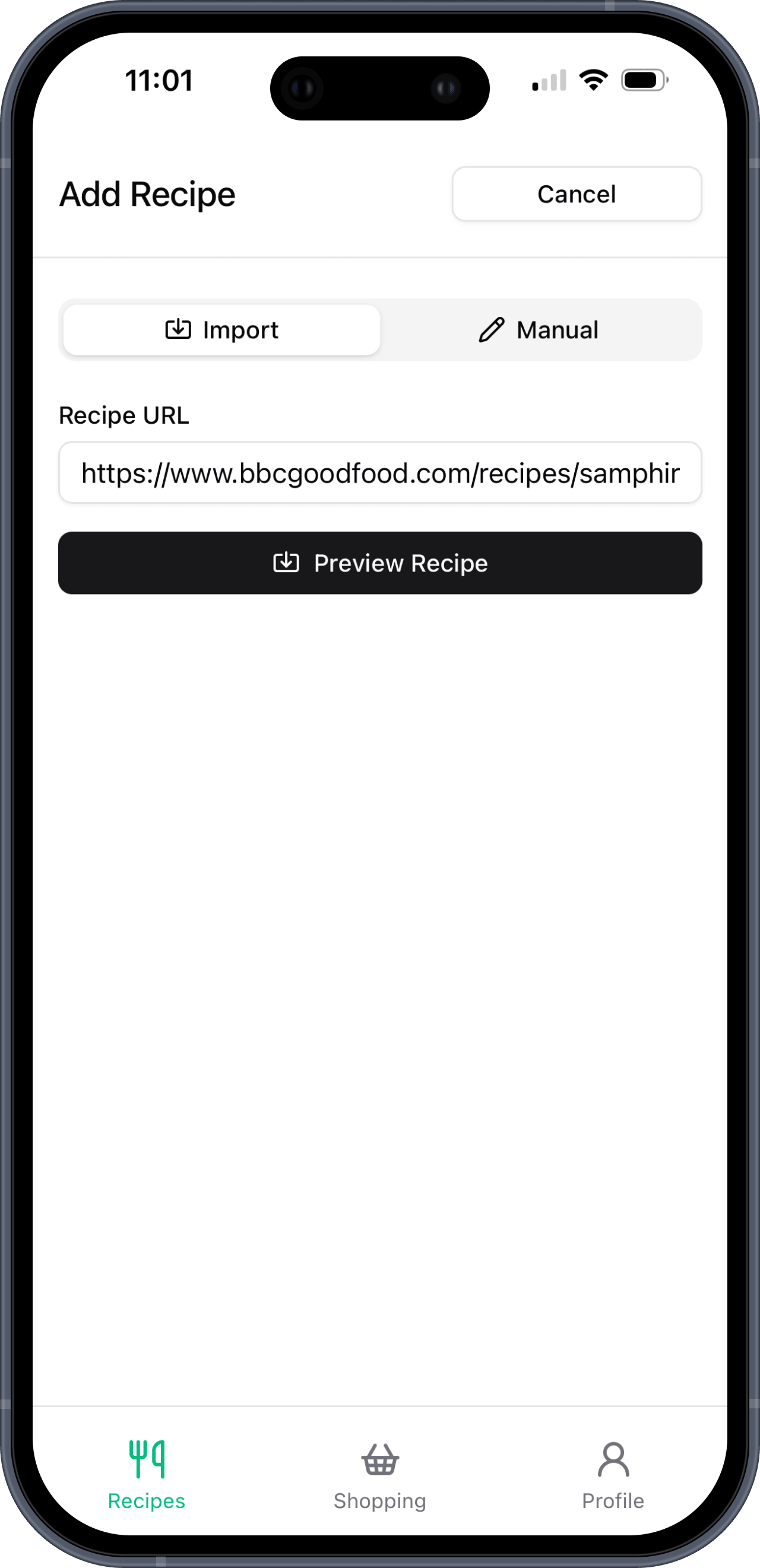
Recipe URL importer
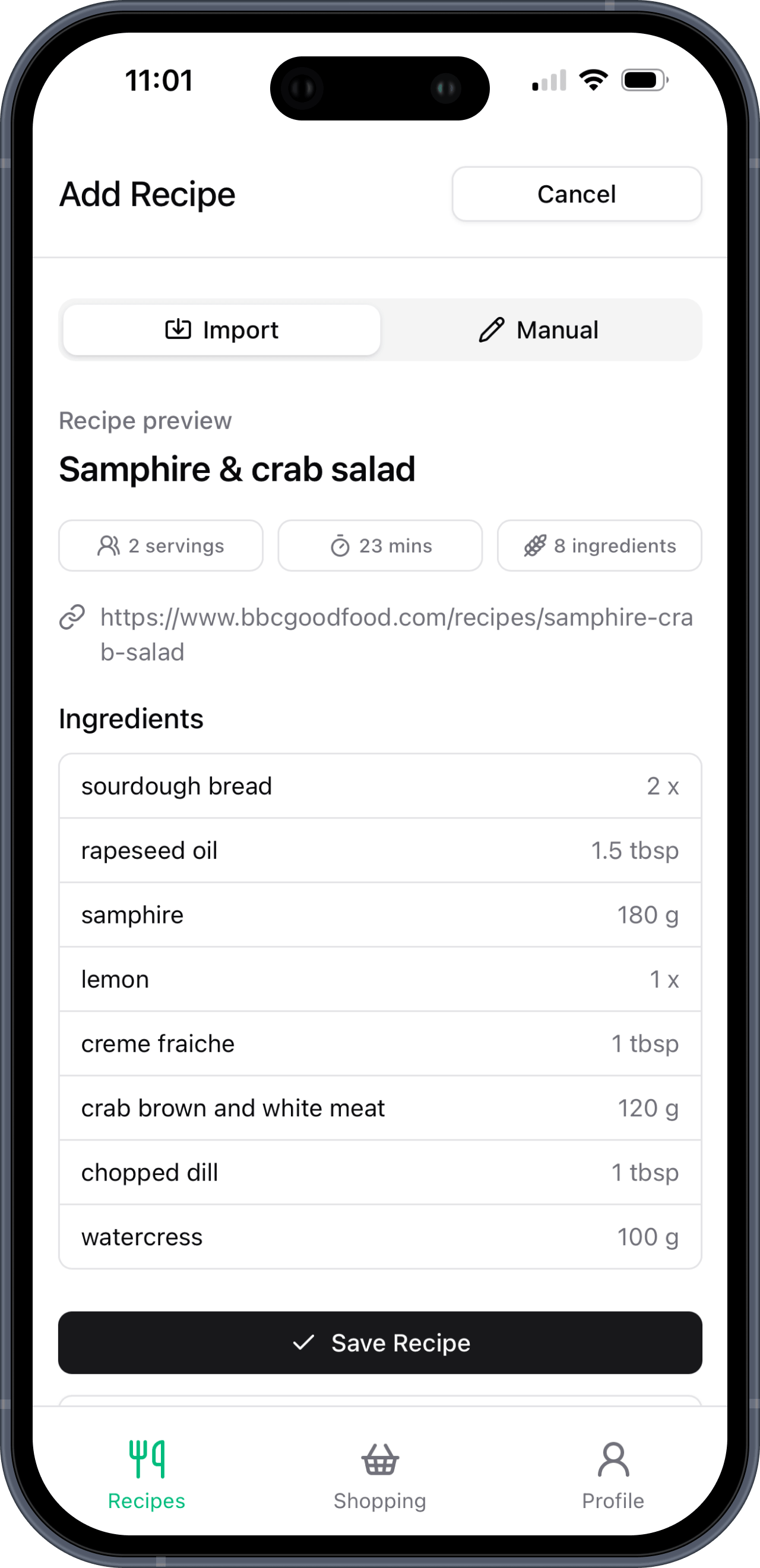
Found dinner on Gousto, BBC Good Food, a blog, or anywhere else public? Drop in the URL and Basket List prepares the recipe for you, ingredients and all. Preview it, save it to your cookbook, then use it in shopping lists whenever you plan a shop. Manual entry is still there for family favourites or recipes without a public link.
Basket List pulls out the recipe name, cooking time, servings, and ingredients for you.
Check the imported ingredients first, then save it to your cookbook when it looks right.
Imported recipes work like everything else: choose servings and generate one combined shop.

Shared shopping lists
Plan meals at home, shop from the same list, and tick things off live. Useful when one person plans, another shops, or you split the supermarket aisles between you.
Combined ingredients from every selected recipe
Shared lists for the household
Live updates while shopping
Tick items off as you go
Works wherever you shop
Recipe-box alternative
Save the meals you already know you like, pick what you're cooking this week, and build a supermarket shopping list from those recipes instead of paying recipe-box prices every time.
Why people switch
Recipe boxes are convenient, especially when you want new dinner ideas. Over time, many households start repeating the same favourite meals and want a lighter way to keep that routine going.
What Basket List does
Basket List keeps the useful planning part: saved recipes, servings, and one organised ingredient list. You still choose where to shop and which brands, swaps, and quantities suit your household.
“We were spending £60 a week on Gousto on top of our normal shop. When we cancelled and started buying those same ingredients at the supermarket, our weekly shop went up a little but the overall cost came right down. We saved just over £2,000 in the first year.”
Who it's for
Some people plan a full week on Sunday. Others wing it day by day. Either way, the annoying bit is the same: writing out what you need to buy. That's the bit we handle.
Households
One person plans, another shops, everyone eats. Keep it all in one place.
Works well when different people do the planning, cooking, and shopping.
Batch cooking
Cook once, portion it out, and stop rebuilding the same prep list.
Good for work lunches, freezer meals, and regular Sunday batch cooks.
Weekly planning
Choose this week's dinners, get one list, and do the shop without a spreadsheet.
Good for households deciding what to cook before the weekly shop.
Compare your options
Basket List is not another ingredient delivery service. These guides explain when it works better to keep the meals, shop yourself, and build one shared list.
Compare UK recipe boxes, supermarket meal planning, recipe apps, and the Basket List workflow.
Read the guideKeep Gousto-style favourites, build one supermarket shopping list, and shop yourself.
Read the guidePlan HelloFresh-style dinners with saved meals, flexible servings, and supermarket choice.
Read the guideWant the feature view instead? See how Basket List turns a recipe to shopping list workflow into a smart shopping list app.
Basket List was built for people who love recipe box meals but not the price tag. Here's a cautious view of the switch.
Based on regular recipe-box users switching to similar supermarket ingredients. Actual savings depend on what and where you shop.
Once your recipes are in, just pick meals, set servings, and the list is done. Importing URLs keeps first-time setup much lighter.
Sorted by type so you can find things quickly. New ingredients are added regularly based on what people are cooking.
Add it to your phone
Basket List works as a progressive web app, so you can add it to iPhone or Android and launch it like a normal app. Open it from your home screen to see your shopping lists when you're walking around the supermarket.
No app store needed. It takes about a minute.
Pricing
14-day free trial, no card needed. Both plans include everything — unlimited recipes, unlimited lists, and sharing with your whole household. The only difference is monthly vs annual billing.
Save £11/year vs monthly
Billed monthly
One plan covers your whole cookbook. Invite your partner, housemates, kids — everyone gets full access at no extra cost.
There's a 14-day free trial, no card needed. After that it's £3/month or £25/year. One plan covers your whole household — no per-person charges.
Signing up takes a minute. Importing your first few recipe URLs is much quicker than typing them out, and you can still add recipes manually when you need to. After that, building a weekly shopping list is really quick.
Yes. Paste a public recipe URL and Basket List creates a preview with the recipe details and ingredients. Check it, save it, then use it in shopping lists like any other recipe.
Yes — anyone in your cookbook sees the same lists. Invite them with your cookbook's invite code. When someone ticks off an item in the shop, everyone else sees it update straight away.
If two recipes both need onions, we merge them into one line with the right total. You get one list to shop from instead of flipping between recipes trying to add things up.
That's exactly what it's built for. You keep the meal planning side — picking recipes, getting a shopping list — but buy the ingredients yourself at normal supermarket prices. See the Gousto alternative and HelloFresh alternative pages for the full comparison.
Yes, any recipe at all. Family ones, stuff from cookbooks, things you found on Instagram. Add the name, ingredients, cooking time, and optionally a link to the original. It stays in your cookbook forever.
Mostly people who got tired of paying for recipe boxes but liked having their meals planned. Also meal preppers who batch cook the same things, and families who want one shared list instead of scattered notes and group chats.
Save your favourite recipes, pick this week's meals, and turn them into one smart supermarket shopping list.
No credit card required

